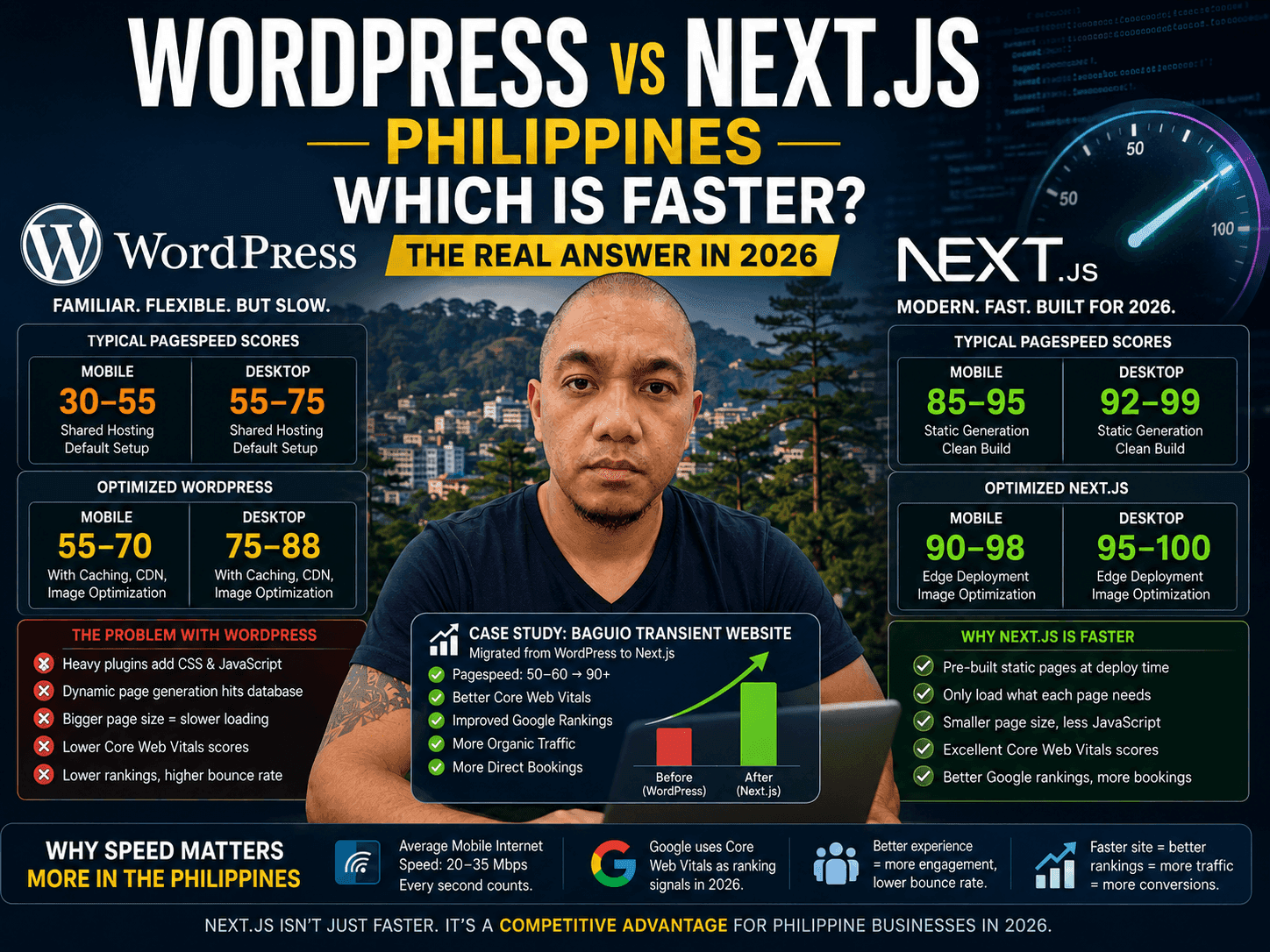
WordPress vs Next.js Philippines — Which Is Faster? (The Real Answer in 2026)
Every Filipino small business owner building a website in 2026 hits the same fork in the road: WordPress or Next.js? WordPress is what everyone recommends. It is familiar, there are thousands of tutorials in Filipino, and your web developer probably knows it already. So why would you consider anything else?
Because I have seen what happens when you migrate from one to the other. I helped migrate a Baguio transient house website from WordPress to Next.js — and the difference was not subtle. Rankings moved. People stayed on the site longer. Bookings went up. This post is the honest breakdown of what changed and why, so you can make the right call for your own business.
Is Next.js Faster Than WordPress?
Yes — Next.js is faster than WordPress. It pre-builds pages into static HTML instead of assembling them from a database and plugins on every visit, so a standard Next.js site scores 85–98 on Google PageSpeed mobile while a typical WordPress site scores 30–70. On the mid-range Android phones and 4G connections most Filipinos browse on, that gap is the difference between a page that loads in under 1.5 seconds and one that takes 5 to 8.
And it is not faster by a small margin — it is faster by a margin that Google measures, rewards, and punishes you for. If your goal is to rank on Google Philippines in 2026, WordPress has a ceiling that Next.js simply does not have. That is my honest opinion after building and migrating multiple sites, and the rest of this post explains exactly why.
Why Speed Matters More in the Philippines Than Anywhere Else
Philippine mobile internet speeds average 20–35 Mbps. That is functional but not fast. A bloated WordPress site loading 4–6MB of scripts, stylesheets, and plugin assets on a shared hosting server in Singapore or the US is going to feel slow on a Filipino mobile connection — because it is slow.
Google measures this. Core Web Vitals — Largest Contentful Paint (LCP), Interaction to Next Paint (INP), and Cumulative Layout Shift (CLS) — are real ranking signals now. A slow site does not just frustrate your visitors. It tells Google your page is a worse result than a faster competitor covering the same topic. In a country where most web browsing happens on mobile with mid-range data connections, this matters more than it does in markets with faster infrastructure.
The Real PageSpeed Numbers: WordPress vs Next.js
Based on sites I have worked on and tested in the Philippines, here is the honest range you can expect:
| Platform | Mobile Score | Desktop Score | Notes |
|---|---|---|---|
| WordPress (default setup) | 30–55 | 55–75 | Shared hosting, default theme, common plugins |
| WordPress (optimized) | 55–70 | 75–88 | Caching plugin, image compression, paid hosting |
| Next.js (standard build) | 85–95 | 92–99 | Static generation, no unnecessary scripts |
| Next.js (optimized) | 90–98 | 95–100 | Edge deployment, image optimization, clean build |
The ceiling on optimized WordPress is roughly where Next.js starts. You can spend hours installing WP Rocket, Imagify, and a premium CDN — and still not reach the baseline of a standard Next.js deployment. That time and money is the hidden cost nobody talks about when they tell you WordPress is the "easy" choice.
Case Study: Migrating a Baguio Transient House Website
The clearest example I can point to is a Baguio transient house website — baguiotransient.net — that was running on WordPress when I started working on it. The site had content, it had images, it had been live for a while. But it was slow, the mobile experience was poor, and it was not ranking where it should have been for Baguio accommodation searches.
After migrating to Next.js, three things happened in sequence:
- PageSpeed scores moved from the 50–60 range on mobile into the high 80s and 90s
- Google started rewarding the improved Core Web Vitals — rankings on target keywords improved within weeks
- Better rankings meant more organic traffic, lower bounce rate, and more direct booking inquiries
The chain reaction is real: faster site → better Core Web Vitals → better Google rankings → more traffic → more conversions. It is not magic. It is just the system working the way Google designed it to work. WordPress was capping the first step in that chain.
Why WordPress Is Slow: The Real Reason
WordPress is not slow because it is badly built. It is slow because of how most people use it. The plugin ecosystem is the problem. A typical Philippine business WordPress site has: a page builder (Elementor or Divi), a caching plugin, an SEO plugin (Yoast), a contact form plugin, a security plugin, a backup plugin, and a handful of others. Each plugin adds JavaScript and CSS to every page load. The cumulative weight is enormous.
WordPress also generates pages dynamically by default — every visitor request hits the database, assembles the page, and sends it back. Caching plugins reduce this, but they add their own complexity and still do not match what Next.js does at the architecture level: pre-building pages into static HTML at deploy time, so every visitor gets a file that is already assembled and ready to serve.
Next.js does not have a plugin ecosystem in the same way. You build what you need and nothing more. A Next.js site for a transient house has exactly the components required for that transient house — no contact form plugin loading on every page because you might need it somewhere, no page builder injecting 200KB of JavaScript for visual editing you do in the code.
When WordPress Still Makes Sense
I am not telling you WordPress is worthless. There are real situations where it is the right call.
- You need non-technical staff to update content daily and they cannot work with code or a CMS dashboard built for developers
- Your budget for web development is very limited and you need something working fast using existing templates
- You are running a content-heavy blog where SEO is handled through content volume rather than technical performance
- Your developer knows WordPress deeply and does not know Next.js at all — a skilled WordPress developer outperforms an inexperienced Next.js developer
The honest answer is: WordPress is a tool, and it is a good tool for certain jobs. The problem is that Filipino business owners are being sold WordPress as the default for everything — including performance-critical use cases like transient house booking sites, local service businesses competing on Google, and any site where speed directly affects conversion rate.
The SEO Reality in 2026
Google's Core Web Vitals have been a ranking factor since 2021. Five years later, most Filipino business WordPress sites still score below 60 on mobile. That is not a coincidence — it is a structural problem with how WordPress is typically deployed in this market.
Meanwhile, a well-built Next.js site running on Vercel or similar edge infrastructure consistently scores 90+ on mobile without extraordinary optimization effort. The gap between a 55-scoring WordPress site and a 92-scoring Next.js site is not just a technical difference. It is a Google rankings difference. It is a "your competitor shows up on page one and you do not" difference.
For any Philippine business where organic search traffic matters — and for most SMEs it should be the primary long-term channel — Next.js is not the experimental choice in 2026. It is the serious choice. WordPress is the legacy choice you stay on because migrating feels difficult, not because it is the better option.
What the Migration Actually Costs
The objection I hear most often is: "But migrating is expensive." That depends on what you compare it to. The cost of migrating to Next.js is a one-time expense. The cost of staying on a slow WordPress site is paid every month in lower rankings, higher bounce rates, and bookings that go to a competitor whose site loads in 1.2 seconds while yours takes 4.8.
For a transient house or small accommodation business, one additional booking per month from improved organic rankings covers the migration cost within a few months. The math is not complicated once you frame it as an investment rather than an expense.
Why I Migrated from WordPress to Next.js — And the Real Results After
The personal story: plugin chaos, a week-long rebuild, PageSpeed 60 → 95+, and occupancy that finally hit 80–90%+
Stop Missing Bookings on Messenger at Night
Speed brings visitors to your site — this is how you convert them to bookings at any hour
Next.js Website Development for Philippine Businesses
We build fast, SEO-ready Next.js websites for SMEs and accommodation businesses in the Philippines
Frequently asked questions
Is Next.js faster than WordPress in the Philippines?
Does the speed difference actually affect Google rankings in the Philippines?
Can I improve my WordPress site speed instead of migrating?
How long does it take to migrate from WordPress to Next.js?
Is Next.js too technical for Filipino small business owners to manage?
Need this for your business? I build exactly this kind of system for small business owners.
AI SEO Audit →Want the same system for your business?
I'll set up AI automation for your business — just like I did for mine.