How to Connect Claude API to Facebook Messenger — Built and Running in Production
At 2AM on Christmas Eve, a guest messaged the transient house asking about rates for December 26 to 28, parking availability, and whether a bonfire was included. The reply came back in under 3 seconds. Accurate rates, parking confirmed, bonfire details included. The guest sent a deposit by morning.
That was not me answering. That was the Claude API, connected to Facebook Messenger through a Node.js webhook, running on a system prompt that knows everything about the property. This post is the exact build — what it looks like, how it works, and the three things that determine whether it actually performs in production.
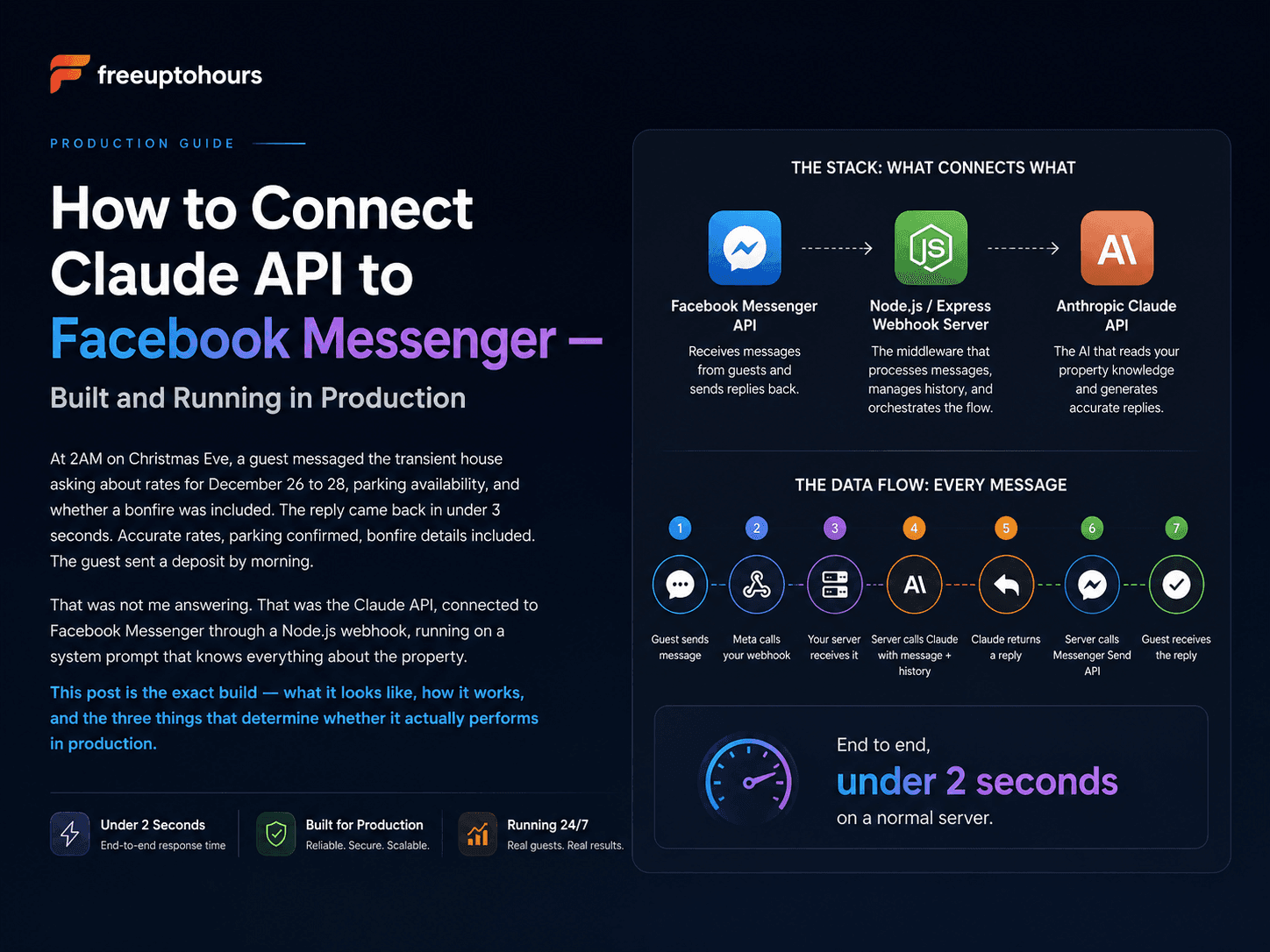
The Stack: What Connects What
The integration has three components. Understanding what each one does prevents the most common mistakes.
- Facebook Messenger API — Meta's platform that receives messages from guests and sends replies back. You interact with it through a webhook (a URL on your server that Meta calls every time a message arrives) and through the Send API (which you call to send a reply)
- Node.js / Express webhook server — the middleware that receives the incoming Messenger event, extracts the guest's message, sends it to Claude with the conversation history, receives Claude's reply, and sends it back to Messenger
- Anthropic Claude API — the AI that reads the system prompt (your property document), understands the guest's message, and generates a reply
The data flow on every message is: guest sends message → Meta calls your webhook → your server receives it → your server calls Claude API with the message + conversation history → Claude returns a reply → your server calls Messenger Send API → guest receives the reply. End to end, this takes under 2 seconds on a normal server.
Step 1: Set Up Your Meta Developer App
Before writing a line of code, you need a Meta Developer account and a Facebook app configured for Messenger. Go to developers.facebook.com, create an app, and select Messenger as the product. Connect it to your Facebook Page.
The permissions you need are pages_messaging (to send and receive messages) and pages_read_engagement. For a business page you own and admin, you can use these in development mode without going through full app review. Full app review is only required if you want the bot to work for pages you do not own — for your own business page, development mode is sufficient.
You will need three credentials from Meta: your Page Access Token (used to send messages via the Send API), your App Secret (used to verify webhook calls are genuinely from Meta), and a Verify Token you create yourself (used during the webhook verification handshake). Store all three as environment variables — never hardcode them.
Step 2: Build the Webhook in Node.js
Your webhook is an Express server with two routes. The first handles GET requests — this is the webhook verification Meta sends when you first register the URL. Meta sends your Verify Token as a query parameter; your server must return the challenge value Meta includes. The second handles POST requests — these are the actual incoming messages.
On each POST, your server receives a JSON payload containing the sender's Page-Scoped User ID (PSID) and the message text. Extract both. Use the PSID as the conversation identifier — you need to retrieve the conversation history for this user, pass it to Claude, and store Claude's reply and the user's message back into that history after each exchange.
Conversation history management is where most implementations fail. Claude has no memory between API calls — every call is stateless. You are responsible for maintaining the thread. A simple in-memory store works for testing. In production, use a database (even a Google Sheets integration works for low-volume use) so that history survives server restarts and you can inspect conversations manually.
Step 3: The System Prompt — This Is 80% of the Work
Most developers treat the system prompt as an afterthought. It is not. The webhook code is plumbing — any competent developer can wire it up in a day. The system prompt is what determines whether the chatbot is actually useful or whether it hallucinates your rates, makes up policies, and destroys guest trust.
The system prompt for a transient house needs to contain, at minimum: the exact rates for every room configuration and every date tier (weekday, weekend, holiday), what is included at each rate (parking, bonfire, linen, kitchen access), check-in and check-out times, house rules, how to make a reservation and what deposit is required, what the cancellation policy is, and a clear instruction for what to do when the guest asks something not covered in the document.
That last instruction is the most important one in the entire prompt: "If the guest asks anything you are not certain about based on the information above, do not guess. Tell them: 'Let me check that for you — our team will reply within a few minutes.' Do not provide an answer you are not certain is correct." This single instruction prevents hallucination from becoming a guest relations problem.
The system prompt for a real property typically runs 800 to 1,500 words. That is not excessive — it is comprehensive. Every FAQ you have ever answered manually should be in that document. The quality of the chatbot's answers is directly proportional to the quality and completeness of the system prompt. A thin prompt produces a chatbot that guesses. A thorough prompt produces a chatbot that answers correctly.
Step 4: Model Selection — Do Not Default to Opus
Claude has multiple model tiers. Claude Opus is the most capable. It is also the most expensive and the slowest. For a Messenger chatbot handling guest inquiries about rates and availability, Opus is the wrong choice for 90% of conversations.
Claude Haiku is roughly 20 times cheaper per token than Opus and significantly faster. For the conversational, factual task of answering "Magkano po for 8 persons this December?" from a well-written system prompt, Haiku performs at a level guests cannot distinguish from Opus. The difference in capability only becomes relevant for complex reasoning tasks — not for property FAQ responses.
The practical approach: use Haiku as the default for all standard inquiries. If you want to handle edge cases with more nuance, you can build logic to escalate specific message types to Sonnet or Opus — but for a Philippine transient house or small business chatbot, Haiku handles the full workload at a fraction of the cost. At typical inquiry volumes (50 to 200 messages per day), Haiku keeps the running cost under ₱1,500 per month.
Step 5: Human Escalation — Not Optional
Every Claude-powered Messenger integration needs a human fallback. Claude will always encounter questions outside its training — unusual requests, complaints, guests in distress, payment disputes. When that happens, the system needs to handle it gracefully rather than producing a confused or incorrect response.
The escalation flow in the live system works in three layers: Claude recognizes when a question is outside its knowledge and tells the guest directly — "Our team will get back to you within a few minutes" — rather than guessing. The conversation is flagged in the inbox so it stands out during manual review. And a notification is sent so the owner knows a human response is needed without having to monitor Messenger constantly.
This triple-layer approach means guests are never left waiting for an answer that will never come, the owner knows exactly which threads need attention, and the chatbot's limitations are transparent rather than hidden. A guest who receives "our team will reply shortly" and then gets a human reply within the hour has a better experience than a guest who receives a hallucinated answer that turns out to be wrong.
What the Live System Delivers
The Claude + Messenger integration running on the transient house in Baguio handles more than 90% of all inquiries without human intervention. Replies go out in under 3 seconds at any hour — 2AM on Christmas Eve included. The system answers in English, Tagalog, and Taglish because the system prompt includes examples of each and Claude handles natural language mixing without explicit instruction.
The remaining inquiries — under 10% — are escalated to a human. These are mostly complex negotiation requests, complaints, or questions about custom arrangements. Exactly the conversations that benefit from a human response.
The business result is the one that matters: more than 10 additional bookings per month that previously went unanswered overnight. Guests who would have moved on to the next listing because no one replied at midnight now receive an accurate, helpful response in seconds. The booking conversion happens at the moment of intent — which in the Philippines is frequently between 9PM and 1AM — instead of being lost to a 7-hour silence.
AI Chatbot Philippines: Costs, What They Do & How I Run One for ₱500/Month
The complete overview of AI chatbots for Filipino businesses — costs, the Messenger-first reality, and which industries they fit.
What Is an AI Chatbot for Transient House in the Philippines?
What the chatbot does from the business owner's perspective — what it answers, what it escalates, and what it costs
How to Handle 100+ Messenger Inquiries Automatically
The full system for managing high-volume Messenger inquiries — including the volume this integration handles daily
AI Chatbot for Messenger — Done-for-You Setup
If you want this built for your business without doing it yourself — what is included and how to get started
Frequently asked questions
How do you connect Claude API to Facebook Messenger?
Which Claude model should I use for a Messenger chatbot?
How do I prevent the Claude chatbot from giving wrong answers?
Does the Claude + Messenger integration work with Tagalog and Taglish?
What happens when Claude does not know the answer?
Need this for your business? I build exactly this kind of system for small business owners.
See How I Build the Automation Stack →Want the same system for your business?
I'll set up AI automation for your business — just like I did for mine.