What Is an AI Chatbot for Transient House in the Philippines? (Built by Someone Who Actually Uses One)
Before I answer the question, let me tell you where I was before I built one.
I run V.O.S. Valencia Baguio — a 15-room transient house in Baguio City. For years, Messenger was my entire job. Wake up at 6 AM, open Facebook, start typing. "Magkano po for 2 persons?" "Available pa kayo this December 28?" "May parking po ba?" "Malapit kayo sa Mines View?" Same questions. Every single day. By the time I finished, it was already 10 PM and I had replied to maybe 80% of the messages.
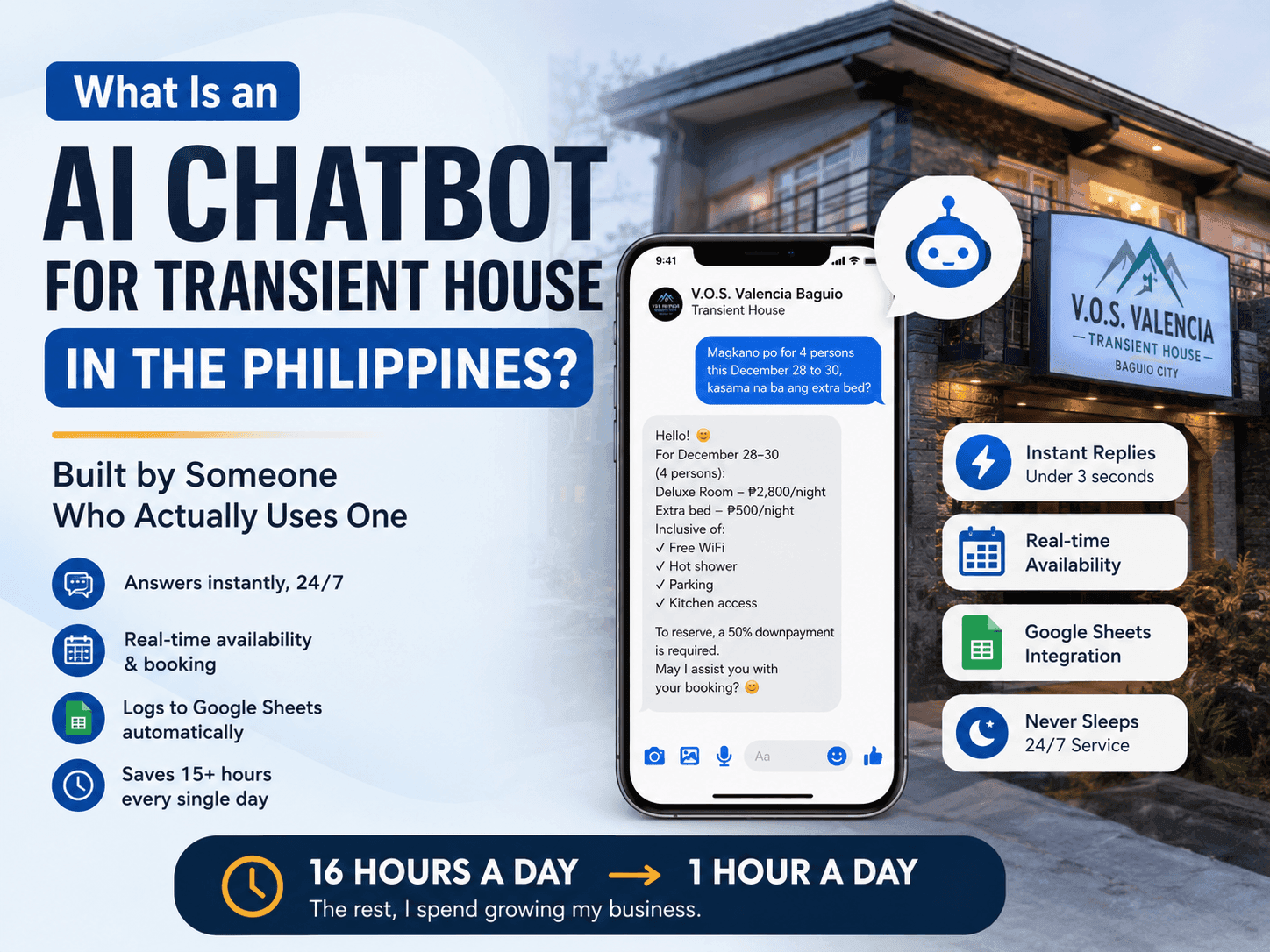
At my worst, I was on Messenger for 16 hours a day. Not growing the business. Not improving anything. Just typing.
Now I spend 1 hour. The rest of my day I spend learning AI automation, building more systems, and honestly — doing things I actually enjoy. The chatbot handles everything else.
So when someone asks me "what is an AI chatbot for transient house Philippines?" — I am not answering from theory. I am answering from 16 hours a day down to 1.
What an AI chatbot actually is — and what it is not
An AI chatbot for a Philippine transient house is a software system connected to your Facebook Messenger that automatically reads every inquiry that comes in and sends a real, intelligent reply — in seconds, not hours.
It is not the Meta instant reply feature that sends one canned message to everyone. It is not ManyChat with button menus that force your guests to click options. Those are rule-based — they only work when the guest uses the exact words you programmed.
A real AI chatbot understands natural language. When a guest types "magkano po for 4 persons this December 28 to 30, kasama na ba ang extra bed?" — it reads that full question, understands the dates, the guest count, and the extra bed concern, and replies with the correct rate, inclusions, and a booking prompt. All in under 3 seconds.
That is the difference. Rule-based tools answer the question you expected. AI answers the question the guest actually asked.
How I built mine — the honest technical breakdown
My chatbot runs on a custom Node.js server on my own laptop — no monthly hosting fee, zero cloud cost. I use an ngrok tunnel to expose it to the internet so Messenger can reach it. The whole setup costs almost nothing to run.
Here is what powers it:
- DeepSeek V4 Flash — handles all the repetitive FAQ replies. Rates, availability, location, amenities. Fast, cheap, accurate. This is where 90% of my inquiries go.
- Claude API — for anything that needs more intelligent reasoning or when I want the writing quality to be higher. Also powers my daily SEO blog posts.
- ChatGPT image generation — for creating marketing images and social media graphics when I need them.
- Node.js webhook — the custom server I built that connects Messenger to the AI models. It receives the message, sends it to the right AI, and posts the reply back to Messenger.
- Google Sheets — every confirmed booking, lead, and guest detail logs automatically. My booking calendar updates in real time.
I did not use a drag-and-drop chatbot builder. I used Claude Code — Anthropic's coding tool — to help me build and debug the entire system. The setup cost me about $20 on Claude Code and around $9 a month to run ($5 for DeepSeek inquiries, $4 on Claude content API).
The domain costs $4 a year. Hosting: $0. My laptop is the server. I just keep it on.
What my chatbot handles — the real list
Before I trained my chatbot properly, I made a mistake. I only gave it 30 or 40 questions to learn from. The replies were generic. Guests could tell it was AI. I kept having to jump in and fix things.
The turning point: I trained it with over 200 real questions from my actual Messenger history. Every weird phrasing. Every Taglish variation. "Pano po mag-book?", "how to reserve?", "paano ang payment?", "may discount po ba for groups?" — all of it. Now it sounds like me.
Here is what it handles every day without my involvement:
- Pricing — room rates per night, weekend vs weekday, peak season rates, group rates
- Availability — "available ba kayo this date?" with real-time calendar checking
- Location questions — exact address, map link, parking info, "malapit ba kayo sa SM Baguio / Mines View / Session Road?"
- Amenities — WiFi, hot shower, parking, kitchen access, pet policy, aircon vs fan rooms
- Booking process — how to reserve, payment methods, downpayment requirements, cancellation policy
- Check-in / check-out times, early check-in requests
- Capacity — how many people per room, extra bed availability and cost
- Frequently asked comparisons — "mas malapit kayo sa ___ kaysa sa ___?"
The only thing I still handle personally is closing the sale. When a guest is ready to pay and needs that final human push — "boss puwede bang magkita-kita tayo?" — I step in. AI can inform. Humans close. That 10% is mine. The 90% before that is the bot's.
The numbers: before and after my AI chatbot
| Metric | Before chatbot | After chatbot |
|---|---|---|
| Daily Messenger inquiries | ~100/day | 300–500/day (SEO + Meta Pixel growth) |
| Hours on Messenger per day | 16 hours | 1 hour (review + close sales) |
| Response time | 30 minutes to 1 hour | Under 3 seconds, 24/7 |
| Inquiries handled without me | 0% | 90% |
| Missed inquiries (2 AM etc.) | All of them | Zero — bot never sleeps |
| Monthly operating cost | ₱0 (my time cost everything) | ~₱500–900/month in API fees |
| Booking calendar updates | Manual, often delayed | Automatic, real-time |
One number I want to highlight: my inquiries went from 100 to 300–500 per day. That did not happen because of the chatbot alone. It happened because once I had a fast website with proper Meta Pixel tracking, my ads got smarter and my SEO started sending free organic traffic. The chatbot made it possible to handle that volume. Without it, tripling my inquiries would have meant tripling my working hours. Instead, I went the other direction.
Why I stopped using Meta's free tools
Before I built my own chatbot, I used Meta's built-in instant reply and keyword responses. Here is what I ran into:
- It looks obviously AI. The replies feel canned. Guests can tell immediately.
- You cannot use custom shortcodes or dynamic data. My system inserts the actual rate based on the dates they ask about. Meta's tool cannot do that.
- It cannot send videos. I wanted to send a short room tour video when guests asked to see the property. Not possible.
- Zero integration with Google Sheets. Every booking still had to be entered manually.
- It only works on exact keyword matches. "Magkano?" triggers. "Pwede malaman ang rates?" — nothing.
I tried ManyChat too. Better than Meta's tools, but still rule-based button flows. Guests do not want to click menus. They want to type naturally and get a real answer. And ManyChat has a monthly fee that grows as your subscribers grow.
The custom AI chatbot I built does not have those limits. It reads any message in any format. It pulls the correct rate for the correct dates. It sends a video link when someone asks to see the room. It logs every conversation to my Google Sheet. And I pay for the AI intelligence only — not a platform fee.
The #1 mistake transient house owners make when automating Messenger
Blank data.
The biggest mistake I see — and made myself early on — is setting up the chatbot with too few training questions. You give it 30 FAQs and call it done. Then a guest asks something slightly different, the bot has no answer, and it either says something generic or fails to reply properly.
An AI chatbot is only as good as what you train it on. I train mine every single day. Every time I notice a conversation that did not go well, I add that question and the correct answer to its knowledge base. Over months, it has learned to sound exactly like me. Guests have told me they were surprised when they found out it was AI.
The rule I follow: train it on at least 200 real questions from your actual Messenger history before you go live. Not generic FAQs — real questions your guests actually asked, in their actual words. Taglish, broken spelling, abbreviations — all of it.
Who this is for — and who it is not for
An AI chatbot for your transient house is for you if:
- You are spending more than 3 hours a day answering the same questions on Messenger
- You are losing bookings because you cannot reply fast enough, especially at night
- You want your business to grow without hiring a full-time chat staff member
- You are willing to spend time training it properly — this is not a "set and forget" tool in the beginning
It is not for you if:
- You have never done any automation before and you expect it to work perfectly on day one
- You want something with zero setup — Meta's free instant reply exists for that
- Your inquiry volume is so low (under 10 messages a day) that the time cost of setup outweighs the benefit
- You are not willing to be involved in training and improving it — blank data kills chatbots
Honest truth: this tool is for small business owners who are ready to get serious about automation. It is not magic. It requires work upfront. But once it is trained properly, it does more than any human could — 24 hours a day, every day, for the cost of a cup of coffee per week.
What I do with the 15 hours I got back every day
I want to be specific about this because I think it matters.
I do not spend those hours watching TV. I spend most of them going deeper into AI — using Claude Code to build more automation systems, learning what is possible with AI agents, and now offering these systems as a service to other Filipino business owners through this website.
The chatbot did not just save me time. It changed what kind of business owner I could be. When you are on Messenger for 16 hours, you have no bandwidth to think. You are always reactive. The moment I had hours back, I started building. And building became this.
That is what an AI chatbot for your transient house actually is: not just a reply machine. It is the thing that gives you back the mental space to actually grow your business instead of just keeping it alive.
How much does it cost to set up an AI chatbot for a Philippine transient house?
| Component | Tool | Monthly cost |
|---|---|---|
| AI for FAQ replies | DeepSeek V4 Flash API | ~$5 (₱280) |
| AI for content & blogs | Claude API | ~$5 (₱280) |
| Chatbot build & debugging | Claude Code | $20 subscription |
| Domain name | Any registrar | $4/year (₱15/month) |
| Hosting | My own laptop + tunnel | ₱0 |
| Image generation | ChatGPT API (as needed) | Per image, minimal |
| Total monthly | — | Under ₱1,500/month |
Compare that to a part-time social media staff member: ₱8,000–15,000 per month, 8 hours a day, offline at night, offline on weekends, sick days, turnover. The chatbot costs less than one week of staff wages and works every hour of every day.
Three resources to go deeper
AI Chatbot Philippines: Costs, What They Do & How I Run One for ₱500/Month
The broad overview of AI chatbots for Filipino businesses — costs, the Messenger-first reality, and which industries they fit.
Case Study: How AI runs 90% of my 15-room transient house in Baguio
The complete before-and-after with every number — hours, costs, traffic, and bookings.
How to Automate a Transient House in the Philippines (The Complete Guide)
The full 5-step system beyond just the chatbot — booking calendar, website, SEO, and follow-up.
Property Management System Philippines: Run 15 Rooms for ₱2,000/Month
The property-management system specifically — what to use to run the rooms for ₱2,000/month instead of ₱15,000.
AI Chatbot Service — what I build for other business owners
What is included, how long setup takes, and how to get started.
Frequently asked questions
What is an AI chatbot for a transient house in the Philippines?
How much does it cost to run an AI chatbot for a Philippine transient house?
Can I use Meta's free Messenger tools instead of a custom AI chatbot?
How long does it take to train an AI chatbot for a transient house?
What percentage of inquiries can an AI chatbot handle automatically?
Do I need technical skills to build or use an AI chatbot?
Need this for your business? I build exactly this kind of system for small business owners.
AI Chatbot for Messenger →Want the same system for your business?
I'll set up AI automation for your business — just like I did for mine.