How I Build an AI Receptionist on WhatsApp With Node.js, LangGraph, and Google Sheets
If you searched for an AI receptionist on WhatsApp built with Node.js, LangGraph, and Google Sheets, you are not looking for a toy. Most "AI chatbots" are exactly that — one prompt that answers a question and forgets everything the moment the next message arrives. A real receptionist is different. It remembers where the conversation is, checks whether the date is open, shows the right options, takes a booking, captures the lead, and knows the exact moment to hand the deal to a human. Here is how I actually build mine.
I build these with Claude Code and the Opus 4.8 model, running on Node.js with LangGraph as the brain and Google Sheets as the booking and lead record. I run one on my own Baguio property and build the same for other businesses. This is the architecture, the real flow, and — the part nobody talks about — the selling psychology baked into it.
What LangGraph Actually Does (the Brain)
LangGraph is a framework for building an AI agent as a graph — a set of steps, called nodes, connected by decisions, called edges, with memory of where the conversation currently is. That last part is the key word: state. Instead of one prompt that answers and forgets, LangGraph lets the agent move through a real multi-step task and choose the next move based on what has already happened. For a receptionist, that is everything. Booking is not one question — it is a sequence that branches, and the brain has to remember the date, the number of guests, and what the customer has already been shown. LangGraph is built for exactly that branching, stateful work.
The Flow My Receptionist Actually Runs
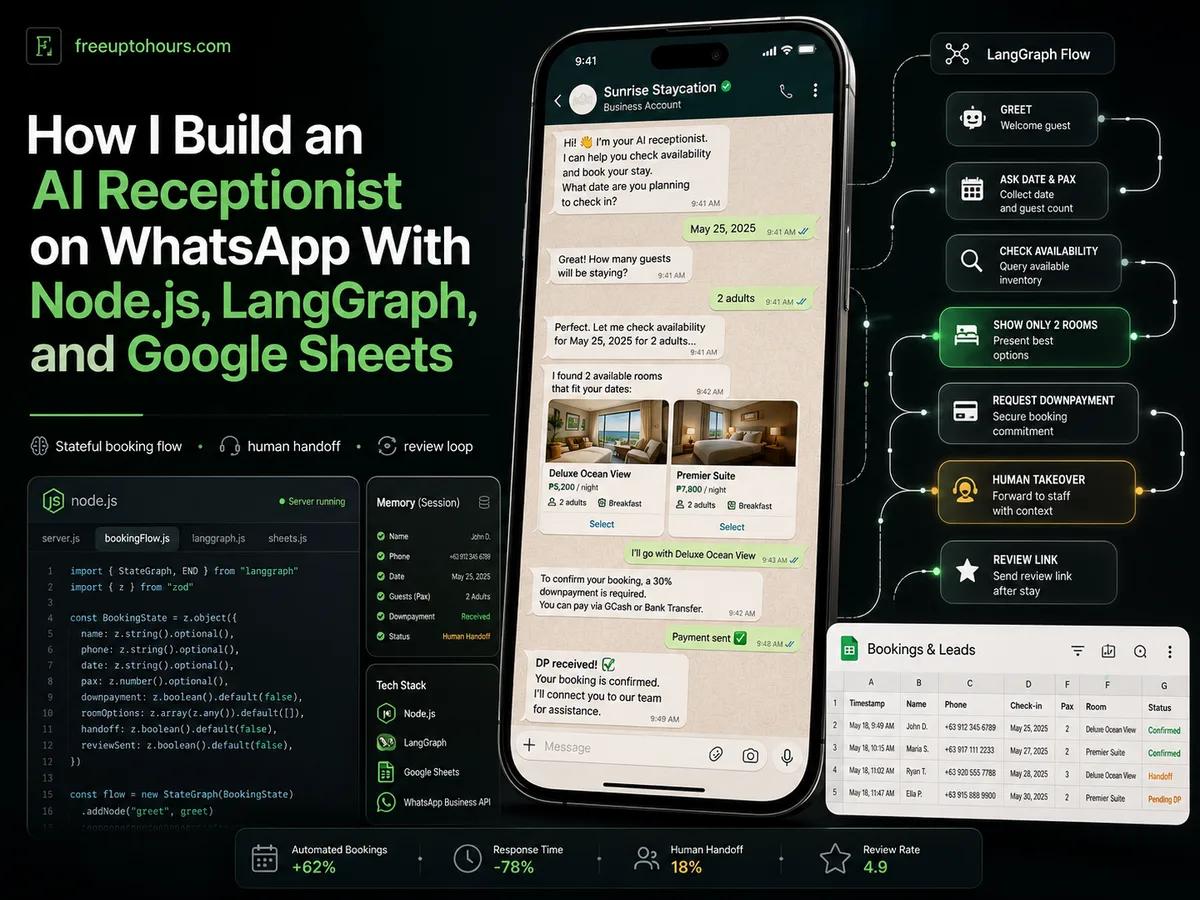
Here is the real sequence the graph runs when a customer messages my WhatsApp. Every step is a node, and Google Sheets is the live record underneath it all.
- It greets the customer first.
- It asks for the date and the number of guests (pax).
- It checks the Google Sheet for which rooms are actually open for that date.
- It shows only two options — even when more are available. This is deliberate, and I explain why below.
- It answers any follow-up question from a library of 200 ready FAQs the business owner answered honestly during setup.
- When the customer is ready to book, the AI requests the downpayment (DP).
- The moment the DP lands, a human takes over to close.
- The human uses shortcodes that automatically write the booking into Google Sheets and send the location and booking details back to the customer.
- After checkout, when a happy customer says thank you, a Google review link automatically fires.
Google Sheets is doing real work here, not decoration. It is the single source of truth for availability and the record every booking and lead is written to — readable by the owner, writable by the system, and cheap. If you want the broader why-WhatsApp picture behind this, I cover that separately; this post is about how the receptionist is built.
The Smartest Decision in the Flow: Show Only Two Rooms
This is the step a generic bot would never make, and it is pure selling. If you show a customer ten rooms, their decision slows to a crawl — too many options is paralysis, not service. Show them two, and the decision is fast, because two is easy to weigh. Two options also reads as limited slots, which adds a quiet urgency that moves people to decide now instead of later. A dumb bot dumps the entire list and calls it helpful. A receptionist built by an operator shows two and gets the booking. That is not a technical decision; it is a business one, and it is the kind of thing you only build in if you have actually sold rooms.
Where the Human Takes Over
The receptionist is not pretending to be a person, and it does not try to close the deal on its own. It handles everything up to the downpayment — the questions, the availability, the options, the booking details. The moment the DP arrives, a human steps in to close, because the final yes is built on trust and that is human work. To keep the human fast, there are shortcodes: short commands that instantly write the confirmed booking into Google Sheets and fire off the location and details. The AI carries the speed and the information; the human carries the relationship and the close. I never confuse the two.
The Review Loop That Feeds Your AI Visibility
The last step looks small and is actually strategic. We do not beg for reviews or spam everyone with a link. The review link only fires when a customer genuinely shows they are happy — the real thank-you at the end. That timing matters: you catch authentic satisfaction at its peak, so the reviews you get are real. And those Google reviews do more than sit on your profile. AI assistants lean heavily on Google Business Profile and reviews when they decide which local business to recommend. So every happy guest quietly strengthens the thing that gets you found and recommended by AI later. The receptionist closes a loop on purpose.
How I Build It — Claude Code and Opus 4.8
The build is not a template I copy. It is custom every time, and here is the real process. First I interview the business — a transient house, a dentist, a repair shop, whatever it is — to understand how it actually works. Then the owner answers at least 200 FAQs, honestly, because that honesty is what makes the receptionist sound like their business and not a generic bot. Claude Code turns all of that into a strategy file that maps exactly what to build. Then I build it with Claude Code in Node.js, with LangGraph orchestrating the flow and Google Sheets wired in as the record, running on a Node.js backend.
The honest part most people skip: it is not done in a day. It runs early, but it takes roughly 30 days of fixing errors one by one until the receptionist is fully customized to that one business — its rooms, its prices, its escalation rules, its voice. That refinement is the difference between a demo and a system you can trust with real customers.
Why This Beats ManyChat and the Old No-Code Tools
A no-code, rule-based tool like ManyChat is fine for simple, fixed flows. But it has a ceiling, and a receptionist lives above that ceiling. It cannot truly hold state across a branching booking conversation, it cannot apply the two-room selling psychology, and it cannot be molded to a single business over 30 days. With Claude Code and the Opus 4.8 model behind me, any custom integration a business needs, I can add — there is no template wall to hit. That is the real line: ManyChat gives you its boxes; a custom LangGraph build gives you whatever the business actually requires. I wrote a full breakdown of that tool-versus-tool comparison separately, so I will not repeat it here.
The difference bites hardest the day you want a new capability added. With a no-code tool, you are limited to the boxes it ships — if the feature is not on their menu, you cannot have it. With a custom build, if the business wants it, it gets built. That extensibility is the real test, and here is how the two compare on what actually decides whether you capture the booking.
| What matters for a receptionist | Custom AI Receptionist (Claude Code + LangGraph) | No-code chatbots (ManyChat, Chatfuel, Botpress, etc.) |
|---|---|---|
| Adding a new capability later | Anything the business wants can be added — a new integration, a new flow, a new feature | Limited to the platform menu and paid add-ons; if it is not supported, you cannot have it |
| Memory across a booking | Stateful — remembers the date, the pax, and what was already shown | Limited — breaks the moment the conversation branches |
| Selling psychology (show only 2 rooms) | Built into the flow | Shows whatever you pre-set, with no real logic |
| Custom integrations (Sheets, DP, shortcodes, review link) | Whatever the business actually needs | Only what the platform offers, often behind higher paid tiers |
| Tailored to one business | 200 real FAQs plus ~30 days of refinement — fully yours | Generic templates, shallow customization |
| Who owns it | You own the system | You rent the platform — leave and it is gone |
| Knows when to hand off to a human | Yes — at the downpayment, by design | Crude at best |
| Setup speed | Slower (~30 days to full) | Fast, in hours — this is their one real edge |
No-code wins on speed to set up and simplicity. The custom receptionist wins on everything that decides whether you actually capture the booking — memory, psychology, integrations, ownership, the human handoff, and above all the freedom to add whatever capability the business asks for next. One honest builder note: Claude Code with Opus 4.8 is what I use because it is strong at this complex, multi-step agentic code, but it is not the only tool that can build one, and LangGraph itself is model-agnostic — it runs on Claude, GPT, Gemini, or a cost-effective model like DeepSeek. The tool is replaceable. The business judgment baked into the flow is not.
Who Needs an AI Receptionist Like This
Transient houses, dentists, clinics, repair shops, contractors, real estate agents — and many more. Honestly, any business that cannot afford to miss inquiries, because missing inquiries is missing money. If customers message you with questions you answer the same way every time, and a slow reply costs you the booking, a receptionist pays for itself. The honest requirement on your side is the 200 FAQs answered truthfully and about 30 days for the system to become fully yours. If you want it built right, message me the word WEBSITE and I will build you the same kind of receptionist I run on my own business.
WhatsApp Chatbot for Business in the Philippines: What I Learned Running One Alongside Messenger
The why-WhatsApp overview behind this build — when WhatsApp matters and how one bot covers both channels.
ManyChat vs Claude API
The full tool-versus-tool comparison — why a custom Claude build beats no-code rule-based bots, in detail.
AI Chatbot Philippines: What They Cost and How I Run One for ₱500 a Month
The foundational overview — what an AI chatbot costs and does in the Philippines, before you scale it into a receptionist.
Tourism Crashed and a War Was On. I Rebuilt My Baguio Business With $20 of AI — Now I Am Booked Solid
The case study where I first built the messaging and booking system this receptionist grew out of.
Frequently asked questions
What is an AI receptionist, and how is it different from a chatbot?
What does LangGraph do in an AI receptionist?
How does Google Sheets fit into the booking and lead capture?
Why show the customer only two room options instead of all of them?
How long does it take to build a custom AI receptionist?
Why build a custom receptionist instead of using ManyChat?
Want the same system for your business?
I'll set up AI automation for your business — just like I did for mine.