Only 16% of Small Businesses Automate Real Operations—How to Join Them Without Annoying Customers (or Leaking Keys in 8 Seconds)
Walk into ten small businesses using AI today and ask what they actually do with it. Eight of them will show you the same thing: writing social media captions and rewriting emails.
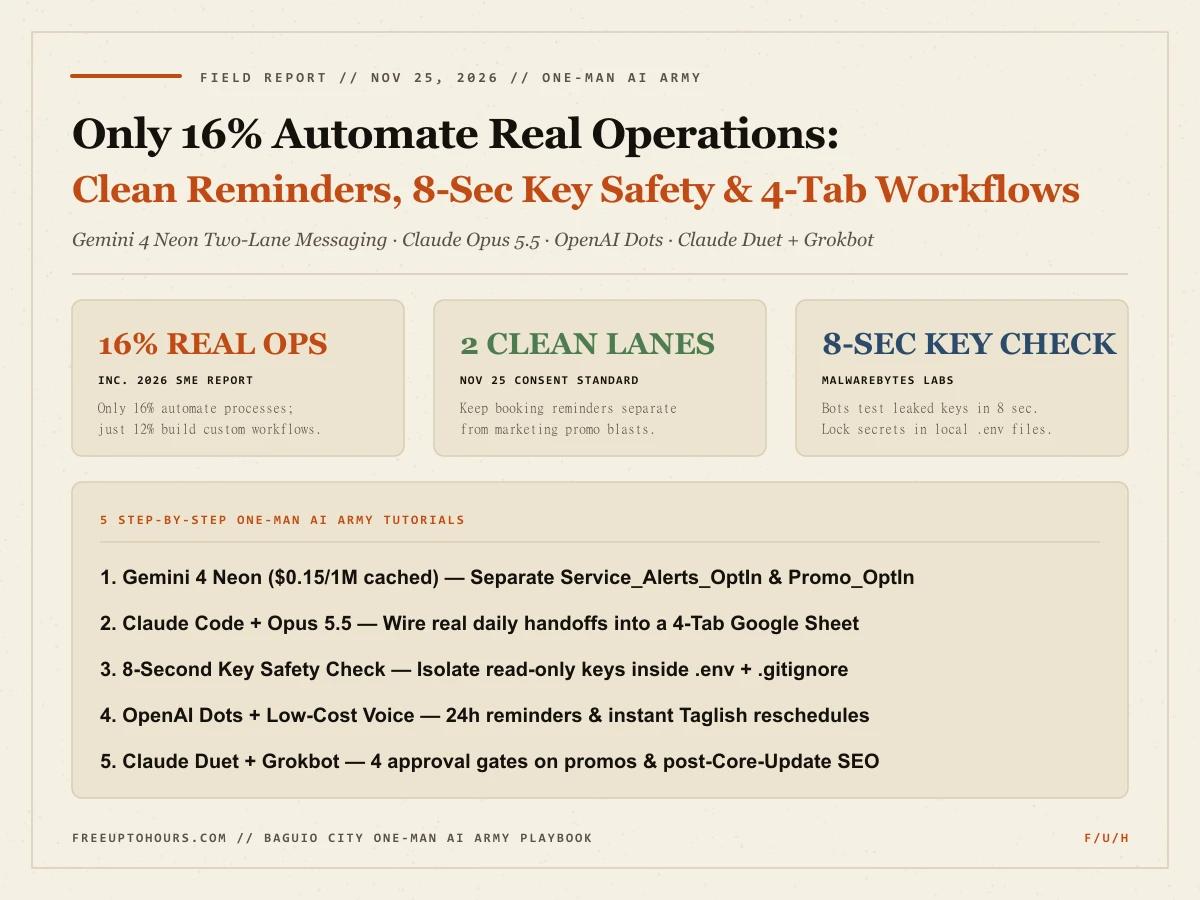
New data published yesterday by Inc. (citing the Counterpart 2026 Small Business Insight Report and the Philadelphia Fed) puts hard numbers on that gap: while small businesses planning to spend over $25,000 on AI jumped from 29% to 38%, only 16% use AI for actual process automation and just 12% use it to build custom workflows. Even more interesting? 19% say AI actually led them to hire more real on-ground workers because their digital bottleneck finally disappeared.
If you want to step into that top 16% today (November 25, 2026), three fresh updates from the past 24 hours give you the exact blueprint:
- Separate "Helpful Reminders" From "Promo Blasts": Today (November 25, 2026), new FCC consent-revocation rules take effect in the U.S.—creating a global best practice every Filipino SME should copy: keep informational messages (booking confirmations, dental appointment reminders, pickup alerts) strictly separate from marketing promos (Famulor). That way, a customer who says "STOP" to holiday ads still receives their room check-in code or technician ETA.
- Never Leak a Key—Not Even for 8 Seconds: Yesterday, Malwarebytes Labs documented an automated bot testing an exposed cloud key within 8 seconds of it touching the public web.
- Smarter Long-Running Custom Workflows: A new benchmark reported today shows Claude Code's compaction retains 77% of strategic decisions while trimming raw command noise down to 0.2%—meaning your custom business automations stay sharp across weeks of tweaks.
In my 15-room #1-ranked Baguio transient house, we don't just use AI to write captions. Our One-Man AI Army automates 100% of real digital operations—bookings, separated reminder/promo lanes, 4-Tab Google Sheet CRM, and local SEO—so only my 2 physical cleaners do physical work.
Here are 5 step-by-step mini-tutorials to move past basic copy-pasting and join the 16% automating real operations.
1. Split Your Messaging Into Two Clean Lanes With Gemini 4 Neon
Nothing makes a loyal guest or clinic patient mute your number faster than mixing holiday promo blasts into the same thread as their check-in details.
Inspired by today's November 25 informational-vs-marketing separation standard, split your customer messages into two crystal-clear lanes powered by Google's Gemini 4 Neon inside Google Antigravity.
Step-by-Step Mini-Tutorial:
- Create two distinct columns in your 4-Tab Google Sheet:
Service_Alerts_OptIn(confirmations, directions, pickup alerts) andPromo_OptIn(holiday packages, seasonal discounts). - Pin both rules inside Gemini 4 Neon's cached prompt ($0.15 per million cached input tokens): Tell Neon to never attach a sales pitch to a booking confirmation, check-in code, or repair ETA.
- Honor instant opt-outs in Taglish: If someone replies "STOP promos" or "Wag na po muna promo", automatically flip
Promo_OptIntoNowhile keeping their active booking or clinic reminders intact.
2. Build Real Process Automation (Not Just Captions) in Claude Code
Remember Inc.'s stat: only 12% of small businesses build custom operational workflows—yet that is where real hours are won back (Inc.).
With Claude Code powered by Claude Opus 5.5—whose compaction now keeps 77% of your strategic business decisions intact across long build sessions (Emergent)—you can wire your core daily workflow in one afternoon.
Step-by-Step Mini-Tutorial:
- Pick ONE repetitive daily handoff to automate first: For transient houses, it's Confirmed Deposit → Room Cleaner Checklist. For dental clinics, it's New Booking → 24-Hour Reminder + Intake Form. For contractors, it's Job Done → Invoice + Review Link.
- Write a 1-page
DECISIONS.mdfile in your Claude Code folder: List your non-negotiable business rules (rates, cutoffs, crew dispatch hours) so every future session stays aligned with your exact policies. - Sync everything to your 4-Tab Google Sheet:
Leads,Bookings,Crew Dispatch, andCashflow—simple enough for any owner to read at a glance.
3. Pass the "8-Second Key Safety Check" Before Launching Any Agent
If automated bots can grab and test a leaked key in 8 seconds (Malwarebytes), "I'll delete that key later" is already too late.
Step-by-Step Mini-Tutorial:
- Keep every API key inside a local
.envfile excluded by.gitignore: Never paste keys into chat prompts, Google Sheets, or public GitHub repos. - Use read-only or single-purpose keys: Your front-desk agent only needs access to your
AvailabilityandLeadstabs—never your full Google Drive or bank logins. - Rotate any accidentally pasted key immediately: If a token ever appears in a screenshot or shared doc, revoke and regenerate it on the spot.
4. Keep Your Calendar & Reminders Effortless With OpenAI Dots & Low-Cost Voice
With OpenAI piloting OpenWorks to bring hands-on AI workflows to local businesses and voice platforms like Cartesia launching $0.03/min managed agents, automated reminders are now cheaper than a single missed appointment.
Step-by-Step Mini-Tutorial:
- Wire your
Bookingstab to OpenAI Dots: Connected across 4,000+ apps with iOS widgets and RCS alerts, Dots fires a clean informational reminder 24 hours before arrival or service—zero promo clutter. - Log reschedules automatically: If a patient or guest replies "Pwede po move to 3 PM?", Dots updates the sheet and pings your physical crew's schedule immediately.
5. Pair Claude Duet Approval Gates With Grokbot & Google's Post-Core-Update Momentum
Now that Google's November 2026 Core Update officially finished rolling out on November 24 (and Google Search AI Mode began integrating Drive and Wallet), clean local signals and disciplined promos matter more than ever.
Step-by-Step Mini-Tutorial:
- Lock all promotional blasts and discounts behind Claude Duet's 4 approval gates: Your informational reminders run automatically; anything promotional pauses in Claude Duet for your one-tap check.
- Run a 5-minute morning scan in Grokbot: Spot local city events, weather shifts, or weekend surges, then publish one genuinely helpful local update via Google Antigravity—compounding your search visibility week after week.
Top-16% Real Process Automation Across Filipino Local Industries
| Local Business Type | What 84% Stop At (Basic Writing) | Top-16% One-Man AI Army Process Automation | Who Stays On-Ground |
|---|---|---|---|
| Transient House / Resort | Writing Baguio travel captions | Separated check-in alerts vs. promo opt-ins via Gemini 4 Neon + 4-Tab Sheet cleaner dispatch | Physical cleaners & caretakers |
| Dental / Vet Clinic | Drafting generic dental-tip posts | Automated 24h informational appointment reminders via OpenAI Dots + intake sync | Dentists, vets, & clinic assistants |
| Salon / Spa | Generating Instagram hashtags | Slot intake + separated promo opt-in + Claude Duet approval for seasonal bundles | Stylists & therapists |
| Plumbing / Aircon / Contractor | Polishing Facebook bio text | Automated ETA updates + 4-Tab Sheet job-to-invoice handoff via Claude Opus 5.5 | Field technicians & installers |
| Print Shop / Local Bakery | Writing product descriptions | Automated "Order Ready for Pickup" alerts + isolated API key hygiene | Bakers, press operators, & riders |
Claim Your Free Live Homepage Proof & Audit
Stop stopping at AI captions. Move into the 16% automating real daily operations—with clean informational reminders, airtight key security, and a 4-Tab Google Sheet that frees your physical team to focus 100% on real-world craft.
Visit FreeUpToHours.com today to claim your free live homepage proof and One-Man AI Army workflow audit. I will show you the exact operational system we run in Baguio—customized for your local business.
Want the same system for your business?
I'll set up AI automation for your business — just like I did for mine.